> ## Documentation Index
> Fetch the complete documentation index at: https://docs.peakmetrics.com/llms.txt
> Use this file to discover all available pages before exploring further.
# Creating Boolean Queries
> PeakMetrics supports a wide variety of advanced search tools. Here we provide information about what search tools you have access to and how best to use them.
**To create an alert using Boolean:**
1. Click the "+" to the right of the "Workspaces" menu in your dashboard.
 2. Make sure that the "Search Type" is toggled to "Advanced Query"
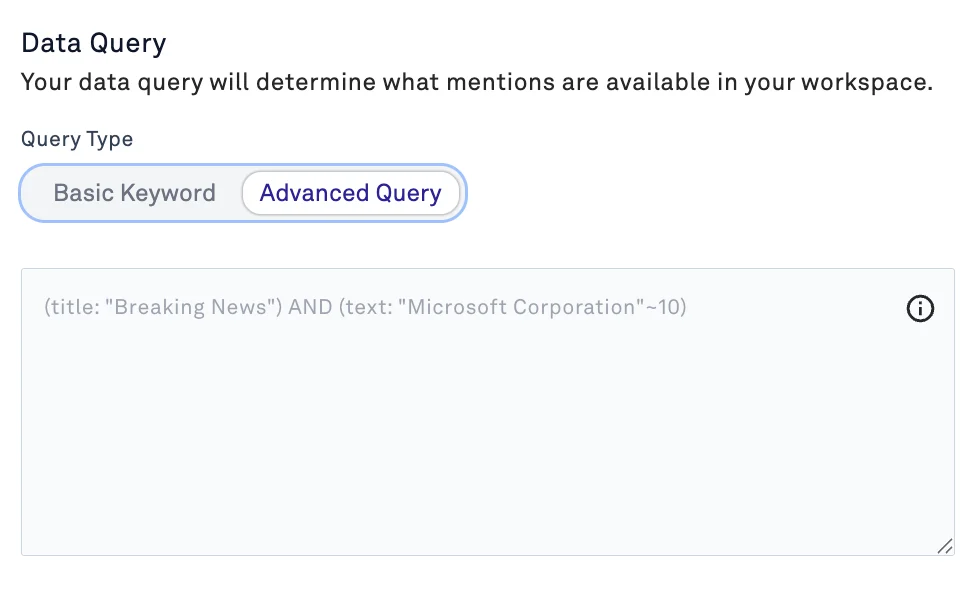 Here, you can use a variety of operators to return the mentions that you're looking for.
## Booleans
By default, we match exact phrases. A search for “regenerative agriculture” will look explicitly for the phrase “regenerative agriculture”.
You can customize this by using:
1. AND (this term **must** be present) example: “regenerative agriculture” AND grasslands ***translates to*** “regenerative agriculture" *and* grasslands
2. OR (either term **must** be present)
example: “regenerative agriculture” OR “organic farming”
***translates to*** "regenerative agriculture" *or* "organic farming"
3. NOT (this term **must not** be present) example: "regenerative agriculture" NOT grasslands
***translates to*** “regenerative agriculture” but not grasslands
## Understanding Boolean Operators
* "cat" OR "black" - this will find all documents where the words "cat" or "black" exist.
* "cat" AND "black" - this will find all documents where the words "cat" and "black" exist.
* "black cat" - this will find all documents that mention "black cat" exactly
## Grouping
Multiple terms or clauses can be grouped together with parentheses, to form sub-queries:
```text theme={null}
(quick OR brown) AND fox
```
### **Search by Author**
Use this syntax to search by an author's name or social handle:
```text theme={null}
Author:Christiano
```
### **Search within Headline**
Use this syntax to search by the headline of an article:
```text theme={null}
title:"Christiano Ronaldo"
```
### **Wildcards**
Wildcard searches can be run on individual terms, using ? to replace a single character, and \* to replace zero or more characters:
```text theme={null}
qu?ck brown fox
```
**Proximity searches** While normal searches (eg "john smith" ) expect all of the terms in exactly the same order, a proximity query allows the specified words to be further apart or in a different order. In the same way that fuzzy queries can specify a maximum edit distance for characters in a word, a proximity search allows us to specify a maximum edit distance of words in a phrase:
```text theme={null}
"fox quick"~5
```
The closer the text in a field is to the original order specified in the query string, the more relevant that document is considered to be. When compared to the above example query, the phrase "quick fox" would be considered more relevant than "quick brown fox".
Find more advanced operators that are available to you in our [advanced Guide to Boolean Searches](/help/everything-boolean/advanced-guide-to-boolean-searches) article.
***
### **Need help?**
Contact [support@peakmetrics.com](mailto:support@peakmetrics.com) to help create strong boolean queries!
Here, you can use a variety of operators to return the mentions that you're looking for.
## Booleans
By default, we match exact phrases. A search for “regenerative agriculture” will look explicitly for the phrase “regenerative agriculture”.
You can customize this by using:
1. AND (this term **must** be present) example: “regenerative agriculture” AND grasslands ***translates to*** “regenerative agriculture" *and* grasslands
2. OR (either term **must** be present)
example: “regenerative agriculture” OR “organic farming”
***translates to*** "regenerative agriculture" *or* "organic farming"
3. NOT (this term **must not** be present) example: "regenerative agriculture" NOT grasslands
***translates to*** “regenerative agriculture” but not grasslands
## Understanding Boolean Operators
* "cat" OR "black" - this will find all documents where the words "cat" or "black" exist.
* "cat" AND "black" - this will find all documents where the words "cat" and "black" exist.
* "black cat" - this will find all documents that mention "black cat" exactly
## Grouping
Multiple terms or clauses can be grouped together with parentheses, to form sub-queries:
```text theme={null}
(quick OR brown) AND fox
```
### **Search by Author**
Use this syntax to search by an author's name or social handle:
```text theme={null}
Author:Christiano
```
### **Search within Headline**
Use this syntax to search by the headline of an article:
```text theme={null}
title:"Christiano Ronaldo"
```
### **Wildcards**
Wildcard searches can be run on individual terms, using ? to replace a single character, and \* to replace zero or more characters:
```text theme={null}
qu?ck brown fox
```
**Proximity searches** While normal searches (eg "john smith" ) expect all of the terms in exactly the same order, a proximity query allows the specified words to be further apart or in a different order. In the same way that fuzzy queries can specify a maximum edit distance for characters in a word, a proximity search allows us to specify a maximum edit distance of words in a phrase:
```text theme={null}
"fox quick"~5
```
The closer the text in a field is to the original order specified in the query string, the more relevant that document is considered to be. When compared to the above example query, the phrase "quick fox" would be considered more relevant than "quick brown fox".
Find more advanced operators that are available to you in our [advanced Guide to Boolean Searches](/help/everything-boolean/advanced-guide-to-boolean-searches) article.
***
### **Need help?**
Contact [support@peakmetrics.com](mailto:support@peakmetrics.com) to help create strong boolean queries!